Bell Riose
June 08, 2026 · 6 min read
Pipao vs Bitly for QR codes: which should you use?
Both tools make dynamic QR codes you can edit after printing. The real decision is about everything around the code: who handles the physical print, what it costs, and whether you need ordering at the table. This is a fair look at where each one wins.
What is Bitly good at?
Bitly is an established, widely trusted platform built first and foremost around links. Its genuine strengths are real and worth crediting:
- Link management depth. Branded short links, custom domains, link history, and bulk creation are core to what Bitly does well.
- Scale and reliability. It's a mature brand many teams already use, with infrastructure built for high volume.
- Analytics. Solid scan and click reporting across links and QR codes.
- Integrations. A broad ecosystem of connections into other marketing and analytics tools.
If your work centers on managing lots of short links and tying them into an existing marketing stack, Bitly is a sensible, capable choice. We won't pretend otherwise.
What is Pipao good at?
Pipao is built around the QR code itself, including the part most tools skip: the physical one. Its distinct edges:
- Print and ship to your door. Pipao closes the full loop — design, choose a print template, buy, and we print the finished QR code and ship it to you. Bitly hands you a file to print yourself. This "design-to-doorstep" loop is the one thing competitors don't do.
- QR table ordering for food and drink venues. On Premium, Pipao runs contactless ordering: menus, per-table QR codes, live order tracking, and promotions, for cafes, fast food, ice cream shops, restaurants, and shisha lounges.
- Affordable entry point. Start free; Premium is $9.99/month.
- Edit after printing. Like Bitly, Pipao's dynamic codes are editable anytime without reprinting.
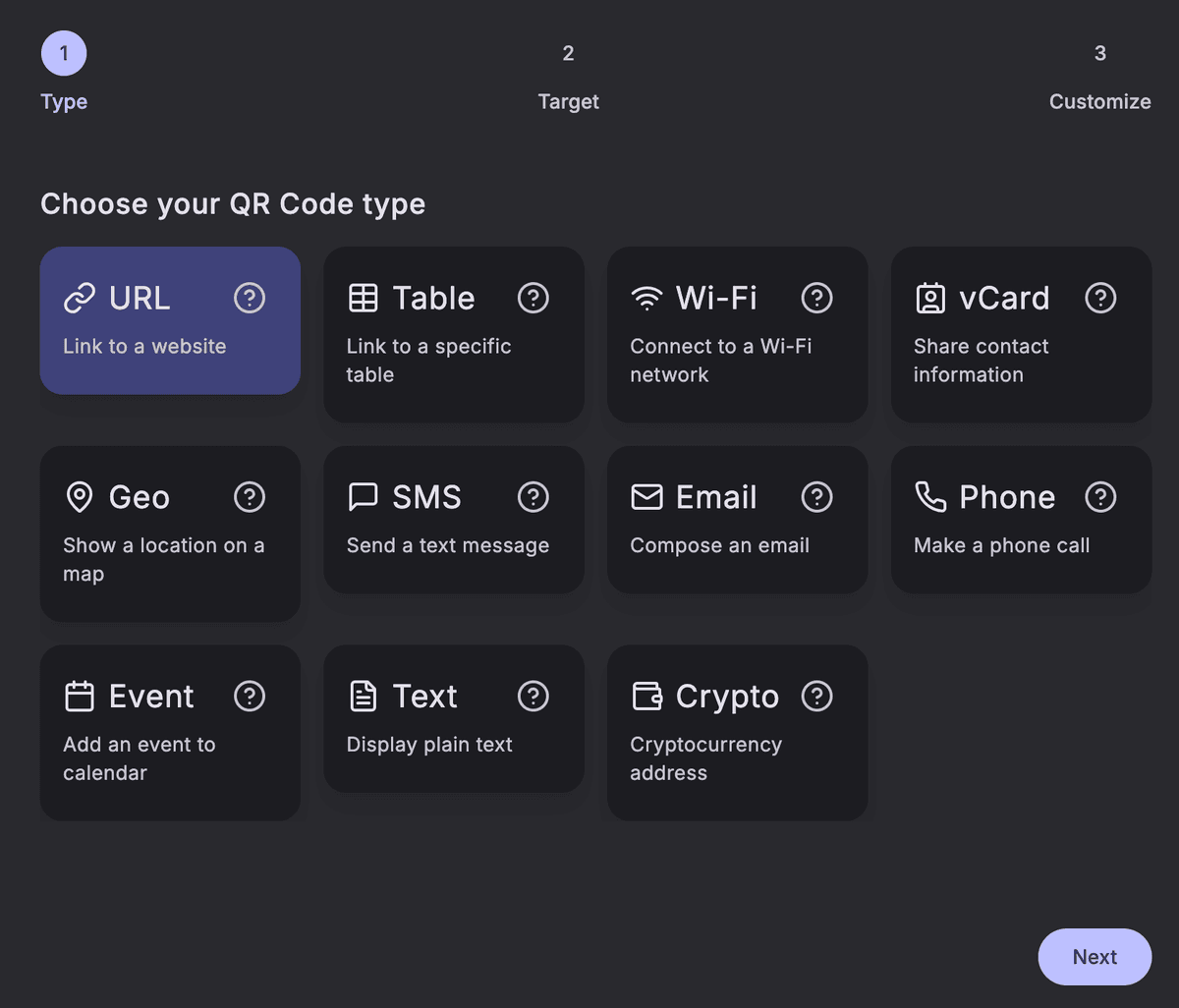
- 11 QR types. URL, Table, WiFi, vCard, Geo, SMS, Email, Phone, Event, Text, and Crypto.
How do Pipao and Bitly compare for QR codes?
| Capability | PipaoPopular | Bitly |
|---|---|---|
| Dynamic QR codes (editable after printing) | ||
| Scan analytics | ||
| Branded short links / link management depth | Basic | |
| Print & ship the physical code to your door | ||
| QR table ordering for food & drink venues | ||
| 11 QR code types | Varies | |
| Entry price | Free, then $9.99/mo | See Bitly's plans |
| Broad third-party integrations | Focused |
Who should pick which?
Choose Bitly if...
- Branded short links and deep link management are your primary need.
- You manage links at large scale across a team or enterprise.
- You rely on a wide range of integrations with other marketing tools.
- You want an established brand already embedded in your stack.
Choose Pipao if...
- You want the QR code printed and shipped to you, not just a file to print yourself.
- You run a food and drink venue and want contactless QR table ordering with menus and live orders.
- You're an event or individual creator (a DJ, a one-off campaign) who needs a branded, editable code fast, without committing to a heavier platform.
- You want a low, predictable price — free to start and $9.99/mo for Premium.
What about static vs dynamic codes?
Whichever tool you choose, the static-vs-dynamic decision still matters. A static code locks its destination at print time; a dynamic one can be repointed anytime without reprinting. Both Pipao and Bitly support dynamic codes. If you're unsure which you need, see static vs dynamic QR codes: which one do you need? and how to choose the right QR type.
Frequently asked questions
Is Pipao a good Bitly alternative for QR codes?
Yes, especially if you want the physical code handled for you. Pipao creates dynamic QR codes you can edit after printing, then prints and ships the finished code to your door. Bitly does not print or ship. For deep link management at scale, Bitly remains the stronger pick.
Does Bitly print and ship QR codes?
No. Bitly generates a QR code you download and arrange to print yourself, through a separate print shop or vendor. Pipao closes that loop: you design the code, choose a print template, and we print it and ship the finished product to your door, no third party needed.
Can I edit a Pipao or Bitly QR code after it's printed?
Both support dynamic QR codes whose destination can be edited after printing, without reprinting. That is the core advantage of dynamic codes over static ones. With Pipao you can update the destination anytime, and the printed code we ship keeps working.
Which is cheaper for QR codes, Pipao or Bitly?
Pipao starts free and Premium is $9.99/month, which covers small businesses and individual creators well. Bitly's plans are positioned for broader link management and tend to scale up from there. Check Bitly's current pricing directly, as plans change.
Does Bitly offer QR table ordering for restaurants?
No. Bitly focuses on links and QR codes, not hospitality ordering. Pipao Premium adds a full QR table-ordering system for food and drink venues: menus, table QR codes, live order tracking, and promotions. If you run a cafe, restaurant, or shisha lounge, this is Pipao's clearest edge.
When should I choose Bitly over Pipao?
Choose Bitly if your priority is large-scale branded short links, advanced link management, deep integrations, and an established enterprise brand for your marketing stack. Choose Pipao if you want the QR code printed and shipped to you, or you need QR ordering for a food and drink venue.
Ready to try the design-to-doorstep loop? Create your first QR code for free.