Bell Riose
December 18, 2024 · 7 min read
5 creative ways to use dynamic QR codes
Dynamic QR codes are not just for restaurant menus. Because the printed pattern points to an address you control — not a link baked into the image — you can change where it sends people anytime, without ordering a new code. That single property unlocks campaigns that evolve: print once, redirect forever, and let scan data tell you what to do next.
Each idea below is answer-first: one bold line stating the play, then exactly how to run it. Pick one, ship it, measure it.
Put one code on the shelf and rotate it between today's promotion, a restock alert, and a loyalty signup as the week goes on — same sticker, different destination.
What makes these campaigns possible?
One thing: the printed code never changes, but its destination can. A static code bakes the link into the pattern, so any change means a reprint. A dynamic code points to a short address you edit in Pipao, so the artifact in someone's hand stays valid while the target evolves. For the full breakdown of the difference, see static vs dynamic QR codes: which one do you need?
That property is what lets a single piece of print do five different jobs over its lifetime — and it is why Pipao can print and ship you a real code you keep forever while you change where it points.
The five campaigns
1. The "link in bio" you actually own
Print one code that always points to your single most important link right now — and change that link whenever your priority shifts. Put it on a business card, flyer, storefront window, or product packaging. This week it sends people to your new release; next week to a booking page; the week after to a waitlist. You never reorder the card, you just edit the destination in Pipao. Unlike a third-party "link in bio" page, the printed code is yours, the redirect is yours, and the scan data is yours. Use a URL code, keep it dynamic, and update the target from your phone in seconds.
2. Seasonal packaging that never goes stale
Print the code on your packaging once, then redirect it from a summer guide to a back-to-school offer to a holiday bundle as the calendar turns. Packaging ships for months and lingers in customers' homes far longer, so a frozen link is wasted real estate. With a dynamic code, the box a customer opens in December points to your December campaign even though it was printed in spring. Map your destinations to your promo calendar in advance, and the packaging quietly markets the right thing all year.
3. Table specials you edit from the floor
Keep the same printed table code and change the dish of the day, the drinks promo, or the whole menu from your phone — no reprinting a single table tent. For cafés, fast-food spots, ice cream shops, restaurants, and shisha lounges, this is the everyday superpower. With a Table code on each table and Pipao Premium ($9.99 per month), every code is wired into the white-label table-ordering system: menus with categories and products, promotions, and live order tracking. Eighty-six an item or run a happy-hour price? Edit the menu once and every table reflects it instantly. See it in context on the restaurants side of Pipao.
4. Event wayfinding on a single badge
Use one code on a badge, lanyard, or signpost and walk attendees through the whole event by redirecting it as the day unfolds. Before doors open it points to the schedule and venue map. During the event it points to the live session, the slides, or the sponsor offers. When it ends it points to the feedback form and next-event signup. The attendee scans the same code all day; you change what they see. A URL or Event code handles this, and event creators can order it as a one-time purchase with no subscription — handy for one-off gigs. More on that on the events page.
5. Product manuals and docs that stay current
Ship a code on the box that always resolves to the latest setup guide, manual, or support page — even after the product has been updated three times. Printed instructions go obsolete the moment you change anything; a dynamic code does not. Point it to your current documentation and update the destination whenever you ship a new version, fix a confusing step, or add a video. The customer who bought the first batch and the customer who bought last week both scan into the same up-to-date help, with zero reprinted inserts.
How do these five campaigns compare?
Different plays, same underlying trick. Here is what each one actually changes over time and the Pipao code type that fits it best.
| Campaign | What you edit over time | Best code type | Reprint needed?Popular |
|---|---|---|---|
| Link in bio you own | The featured destination | URL | Never |
| Seasonal packaging | The seasonal offer page | URL | Never |
| Table specials | Menu, prices, promotions | Table | Never |
| Event wayfinding | Schedule, then live, then feedback | URL or Event | Never |
| Product manuals | The current docs version | URL | Never |
The right-hand column is the whole story: in every case the printed code is reused, not reprinted. That is true whether you generate the image yourself or have Pipao print and ship the finished code to your door.
How do I launch one of these in Pipao?
You can have a campaign code live in a few minutes — and a physical one on its way to your door shortly after.
- 1
Create the code
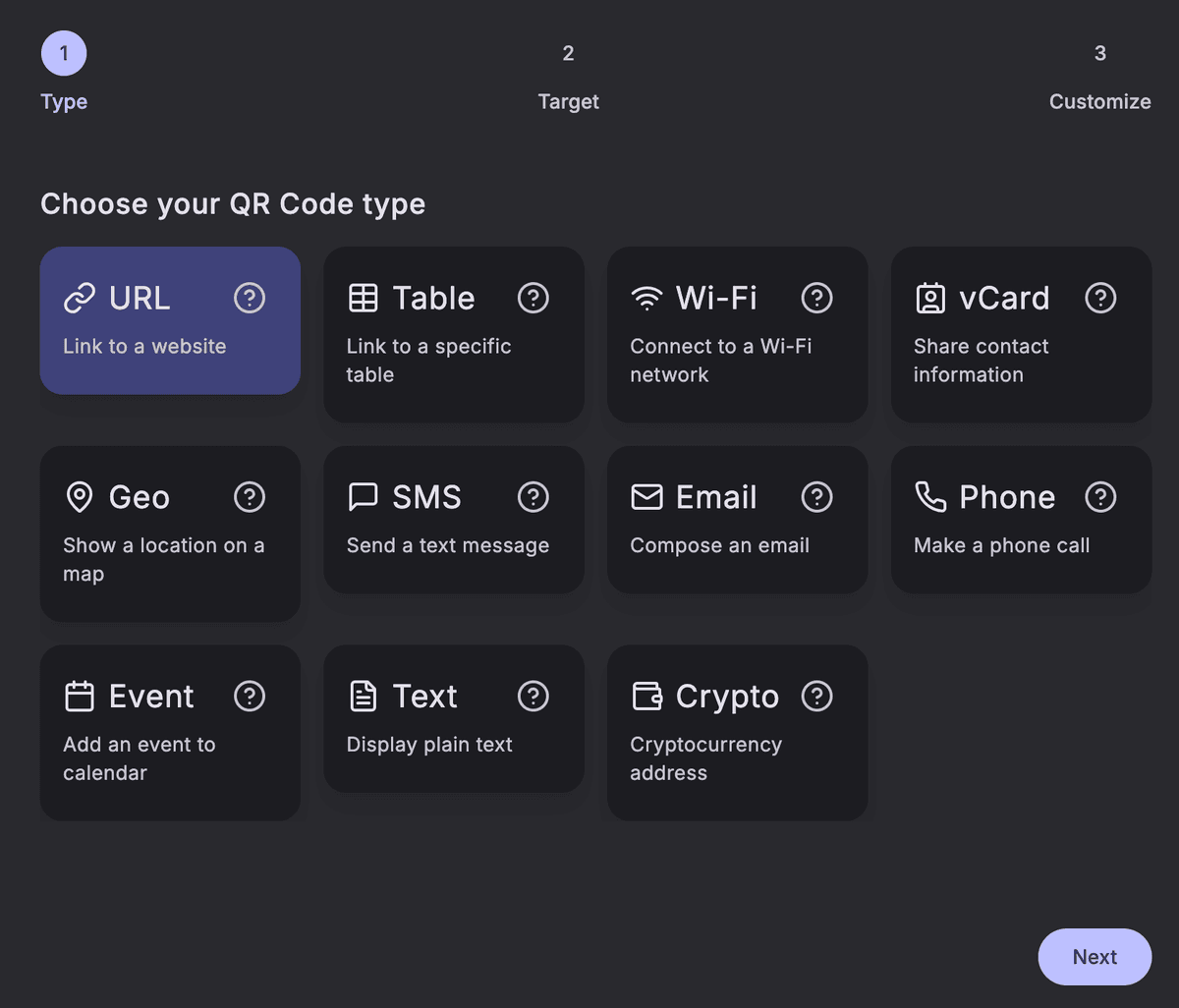
Sign in to your dashboard and pick a type. For most campaigns above that is URL; for a venue it is Table; for an event, URL or Event. Pipao offers 11 types in total — URL, Table, WiFi, vCard, Geo, SMS, Email, Phone, Event, Text, and Crypto.
- 2
Keep it dynamic
Leave the code dynamic so the destination stays editable. This is what lets you redirect it later without reprinting.
- 3
Customize and choose a print template
Add your logo and colors, then pick a print layout for the physical product so the code looks like yours, not a generic black square.
- 4
Buy — print and ship, or just the image
Order it as a one-time purchase for a single campaign code, or print a set of table codes for a venue. We print and ship the finished code to your door; you keep that physical artifact forever.
- 5
Redirect and measure
Edit the destination whenever the campaign moves to its next phase, and watch the scans roll in — count, location, device, and timing — to see which idea earns its placement.
Measure first, then double down
The fastest way to find your best campaign is to run two of these ideas and compare their scans. Pipao gives every code its own analytics — scan count, location, device, and timing — so you can see which placement and which offer actually move people. Learn how to read the numbers in QR code analytics: understanding your scan data.
Frequently asked questions
What is a dynamic QR code campaign?
A dynamic QR code campaign uses a single printed code whose destination you edit over time, instead of printing a new code for every offer. The black-and-white pattern points to an address you control in Pipao, so you can swap where it sends people — a promotion, a schedule, a feedback form — without reprinting anything.
Do I need to reprint the QR code when I change the link?
No. The QR code image stays the same forever — you only edit the destination inside Pipao. Every copy already printed or shipped resolves to the latest destination on the next scan, so a poster, sticker, or table tent never goes out of date.
Can I run a dynamic QR campaign without a subscription?
Yes. You can start free and create dynamic codes, and individuals or event creators can order a printed code as a one-time purchase with no recurring plan. Food and drink venues that want the table-ordering system can add Premium for $9.99 per month, but it isn't required to run any of these campaigns.
How do I know which campaign idea is working?
Every Pipao code has its own scan analytics — scan count, location, device, and timing — so you can compare placements and campaigns side by side. Run two ideas, watch the numbers, and double down on the one that scans.
Will an old printed code still work after I change the destination?
Yes. As long as the dynamic code is active, every previously printed copy keeps working and points to the latest destination. That is the entire point of a dynamic code: you keep the physical artifact forever and only the target changes.
Can Pipao print and ship the QR code for my campaign?
Yes. Pipao runs the full design-to-doorstep loop — create, customize, choose a print template, buy, and we print and ship the finished physical code to your door. You keep that printed code forever and swap its destination as your campaign evolves.
Pick one idea, ship it this week, and let the data tell you what to try next. Build a dynamic code in Pipao — design it, print it, ship it, and keep redirecting it for as long as the campaign runs.